Controlling Talk and Listen Arrows
Clicking a Talk / Listen arrow turns it off. The arrow is no longer displayed on the panel or four-wire.
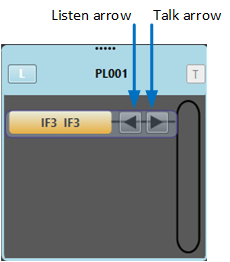
Permanent members of a conference cannot have their Talk/Listen arrow turns off. This can only be done in EHX.
Clicking the space where the Talk / Listen arrow was formerly located turns the arrow on again. The arrow is displayed again on the panel or four-wire.
You must be in Assignment mode to turn Talk / Listen arrows on and off on panels and four-wires.
If you turn off both the Talk and the Listen arrows, the panel or four-wire is effectively excluded from the conference or Port Viewer, and removed from the list of members. To restore the panel or four-wire (and Talk / Listen labels), you must reassign the item to the conference or Port Viewer.
Idents and monitors (split label ports) do not display Talk / Listen arrows (see Idents and Monitors (Split Label Ports)
Key groups display a panel on the right hand side of the item to show if the group is active talk (red) or active listen (green). However, you cannot change the talk or listen status of a key group in Dynam-EC.